
_desktop_list_webp_cf6f183b.webp&w=640&q=75)



UI/UX
UX Audit: How to Know Your Website Is Losing Customers(And Exactly How to Fix It)
7 mins | 17 Mar 2026
The Leak Nobody Sees
Imagine you own a store. Every day, 500 people walk through the front door. But there's a strange thing happening: 400 of them walk in, look around for about 30 seconds, and leave. Not because your products are bad. Not because your prices are wrong. But because they can't figure out where anything is.
That's what a UX problem looks like in real life. And it's what's happening on thousands of Indian business websites right now.
The frustrating thing is that most business owners have no idea. The website looks fine. The design team is proud of it. The developer says it works. But the analytics tell a different story: 78% bounce rate, average time on site under 60 seconds, checkout abandonment at 65%.
Good UX is invisible. Bad UX is silent. The customers who leave because your website was confusing don't send you feedback — they just don't come back.
A UX audit is the process of systematically finding these silent failures — before they cost you another month of wasted traffic and ad spend.
What Is a UX Audit, Actually?
A UX audit is a structured evaluation of your digital product (website, app, or platform) that identifies where users are struggling, why they're abandoning, and what design decisions are reducing your conversion rate.
It's not a design opinion session ('I don't like the colours'). It's a diagnostic process backed by:
- Analytics data — Where users drop off, which pages have high exit rates, where they scroll, what they click
- Heuristic evaluation — Expert review against proven UX principles (Jakob Nielsen's 10 heuristics, accessibility standards, mobile usability guidelines)
- User session recordings — Watching real user sessions via tools like Hotjar or Microsoft Clarity to see exactly where confusion happens
- User testing — If budget allows, observing real users trying to complete specific tasks on your product
The output is a prioritised list of issues with specific recommendations — not a 50-page report of everything that could theoretically be better.
10 Signs Your Website Needs a UX Audit
You don't need to wait for a crisis. These are early warning signs:
- Your bounce rate is above 65% on key landing pages
- Mobile conversion is significantly lower than desktop (more than 30% gap)
- People call or email you asking questions your website should answer
- Your checkout or signup form abandonment rate is above 50%
- Your ad traffic converts at less than 2% on the landing page
- You're getting traffic from SEO or social but not conversions
- New visitors show low engagement but returning visitors convert well (navigation is too complex for first-timers)
- You've made multiple design changes in the last year based on opinions rather than data
- Your page load time on mobile is over 3 seconds
- Support receives repetitive questions about how to do basic tasks on your website
If three or more of these apply, you're almost certainly losing measurable revenue to UX problems that are fixable.
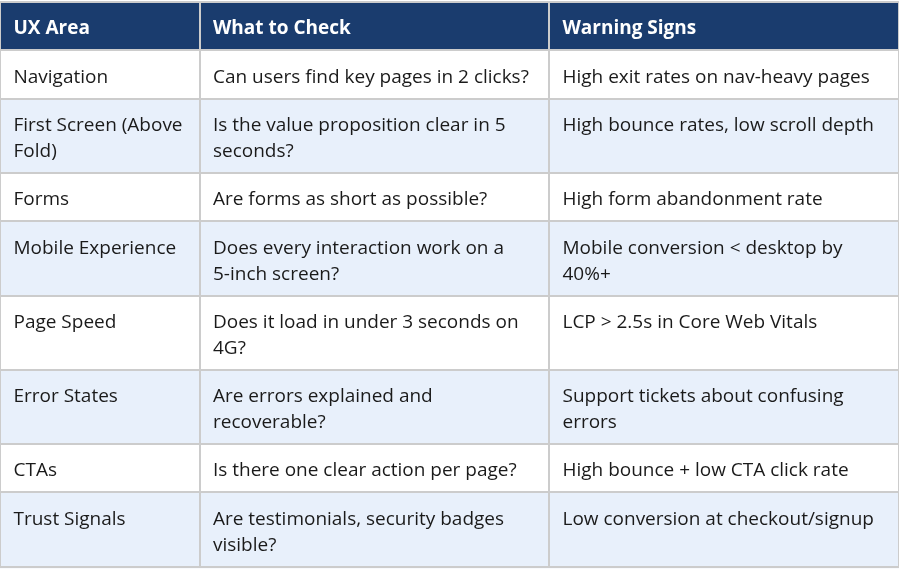
The UX Audit Checklist — 8 Critical Areas
How to Do a DIY UX Audit (The Basics)
Before you engage an agency, here's what you can assess yourself using free or low-cost tools:
Step 1: Set up Google Analytics 4 and review your funnel
If you don't have GA4 installed, do it today. It's free. Once you have data, look at: top exit pages, conversion funnel drop-off, bounce rate by page type, and device breakdown (mobile vs desktop). This tells you where the problems are, not why.
Step 2: Install Hotjar or Microsoft Clarity (both free)
These tools record user sessions and generate heatmaps. Watch 20-30 session recordings on your highest-traffic pages. You'll see scroll depth, rage clicks (when users tap something repeatedly that doesn't respond), and where people get stuck. This is often the most eye-opening part of a self-audit.
Step 3: The 5-second test
Show your homepage to 5 people who don't know your business. Give them 5 seconds. Ask them: 'What does this company do? Who is it for? What should you do next?' If they can't answer clearly, your value proposition and CTA hierarchy need work.
Step 4: Do a mobile walk-through
Go through your entire website on a mid-range Android phone (not your iPhone 15) on a 4G connection. Try to complete the key task (buy something, fill a form, find contact details). Note every friction point.
Step 5: Check Core Web Vitals
Go to Google PageSpeed Insights (free) and paste your URL. Check LCP (Largest Contentful Paint — should be under 2.5s), CLS (Cumulative Layout Shift — under 0.1), and INP (Interaction to Next Paint — under 200ms). These directly affect both user experience and Google rankings.
What a Professional UX Audit Adds
A self-audit finds the obvious problems. A professional audit finds the subtle ones — the ones that require experience with hundreds of user behaviours and pattern recognition that only comes from watching thousands of user sessions.
Professional UX audits also add:
- Competitive benchmarking — How does your UX compare to your actual competitors, not just generic best practices?
- Accessibility evaluation — Are you inadvertently excluding users with visual, motor, or cognitive differences? (Increasingly a legal and commercial requirement)
- Information architecture review — Is your navigation structure logical, or has it grown organically into something that makes sense to you but not to first-time visitors?
- Persona-specific journey mapping — Does the experience work differently for different segments? (Your B2B buyer journeys differently than a consumer)
- Prioritised recommendation report — Not everything needs to be fixed at once. A professional audit tells you what to fix first for maximum impact.
For clients who come to us mid-product (they built elsewhere and conversions are underperforming), a UX audit is usually our starting point. It prevents the expensive mistake of redesigning things that weren't the actual problem.
Real UX Audit Finding: What We Found on a SaaS Client's Onboarding
A B2B SaaS client came to us with a conversion problem. Their free trial signup rate was fine, but trial-to-paid conversion was at 8% — well below industry benchmarks of 15-25%.
The assumption inside the company was that the product wasn't compelling enough. They were about to invest in new features.
We did a UX audit first. What we found: the onboarding flow had 11 steps before users reached the product's core value. Step 6 asked for credit card details 'for subscription setup after trial' — which caused a drop of 58% of users who had made it that far. The core value demonstration (the 'aha moment') was on step 9 of 11.
The fix: removed credit card requirement at signup, reorganised onboarding to show core value in step 2, reduced total steps to 5. Trial-to-paid conversion moved from 8% to 19% in 60 days.
No new features were needed. Just a different order and a removed friction point. The UX audit paid for itself in the first week of the conversion improvement.
How Much Does a Professional UX Audit Cost?
- Basic UX audit (analytics review + heuristic evaluation + report): ₹30,000 – ₹80,000
- Standard UX audit (above + session analysis + user testing with 5 participants): ₹80,000 – ₹2L
- Comprehensive UX audit (above + competitive benchmarking + IA review + full recommendations roadmap): ₹2L – ₹5L
Most clients recover the audit cost within 30-60 days through improved conversion rates from implementing the top 3-5 recommendations.
Is Your Website Quietly Losing Customers?
Let's find out. We offer a free 30-minute UX review — we look at your site, ask you about your analytics, and tell you where we'd look first. No sales pressure, no generic advice.
→ Request a Free UX Review: Contact Us
→ Email: sales@12grids.com | +91 91379 97497
Author

Kadambari Bendre
Sr. Marketing Strategist
Share
Share
Related
UI/UX
AI-Powered UX Design : How to Build Digital ProductsThat Learn From Your Users
9 mins : 17 Apr 2026
_desktop_list_webp_2325ad4d.webp&w=640&q=75)
UI/UX
How to Choose a UI/UX Design Agency in India(Without Getting Burned)
8 mins : 23 Mar 2026

UI/UX
How UPL Built a Unified Digital Identity Across 140 Countries – And What Brands Can Learn From It
3 mins : 26 Nov 2025